


Real-Time Research Highlights
Recent ArcGIS Pro documentation shows that modern GIS professionals are expected to go beyond simple map creation and develop skills in spatial analysis, automation, machine learning, 3D visualization, data management, and Python scripting. ArcGIS Pro continues to expand its capabilities across analytics, cartography, AI-powered workflows, and enterprise collaboration. Organizations increasingly seek GIS professionals who can automate workflows using ModelBuilder and Python while delivering actionable geographic insights.
How to Master ArcGIS: From Beginner to Pro
Understanding ArcGIS and Why It Matters
ArcGIS has become one of the most influential geographic information system platforms used by governments, engineering firms, environmental organizations, utility companies, urban planners, researchers, and businesses worldwide. At its core, ArcGIS allows users to collect, manage, analyze, and visualize spatial data. Yet its true value extends far beyond creating attractive maps. Modern ArcGIS users can solve complex problems involving transportation networks, climate change, public health, disaster management, land use planning, and infrastructure development. ArcGIS Pro now integrates advanced analytics, machine learning capabilities, automation tools, and 3D visualization features that transform raw geographic information into actionable intelligence.
Think of ArcGIS as a powerful microscope for geography. Just as a microscope reveals patterns invisible to the naked eye, ArcGIS uncovers hidden relationships within spatial data. A city planner can identify future development hotspots. An environmental scientist can model flood risks. A logistics company can optimize delivery routes. These capabilities make ArcGIS one of the most valuable technical skills in today’s data-driven economy.
What Makes ArcGIS Different from Other GIS Platforms
Many GIS tools exist, including open-source alternatives. However, ArcGIS stands out because of its comprehensive ecosystem. Users gain access to advanced mapping, analytics, automation, enterprise integration, cloud services, and mobile applications. ArcGIS Pro supports both 2D and 3D environments while allowing seamless integration with ArcGIS Online and enterprise platforms. Organizations often choose ArcGIS because it offers a complete workflow from data collection to analysis and decision-making.
Building a Strong GIS Foundation
Before diving into advanced features, every aspiring GIS professional must understand the fundamentals. Many beginners rush into sophisticated analysis tools without mastering the basics. This approach often creates confusion and limits long-term growth. GIS success starts with understanding how geographic data works and how spatial relationships influence decision-making.
Understanding Spatial Data
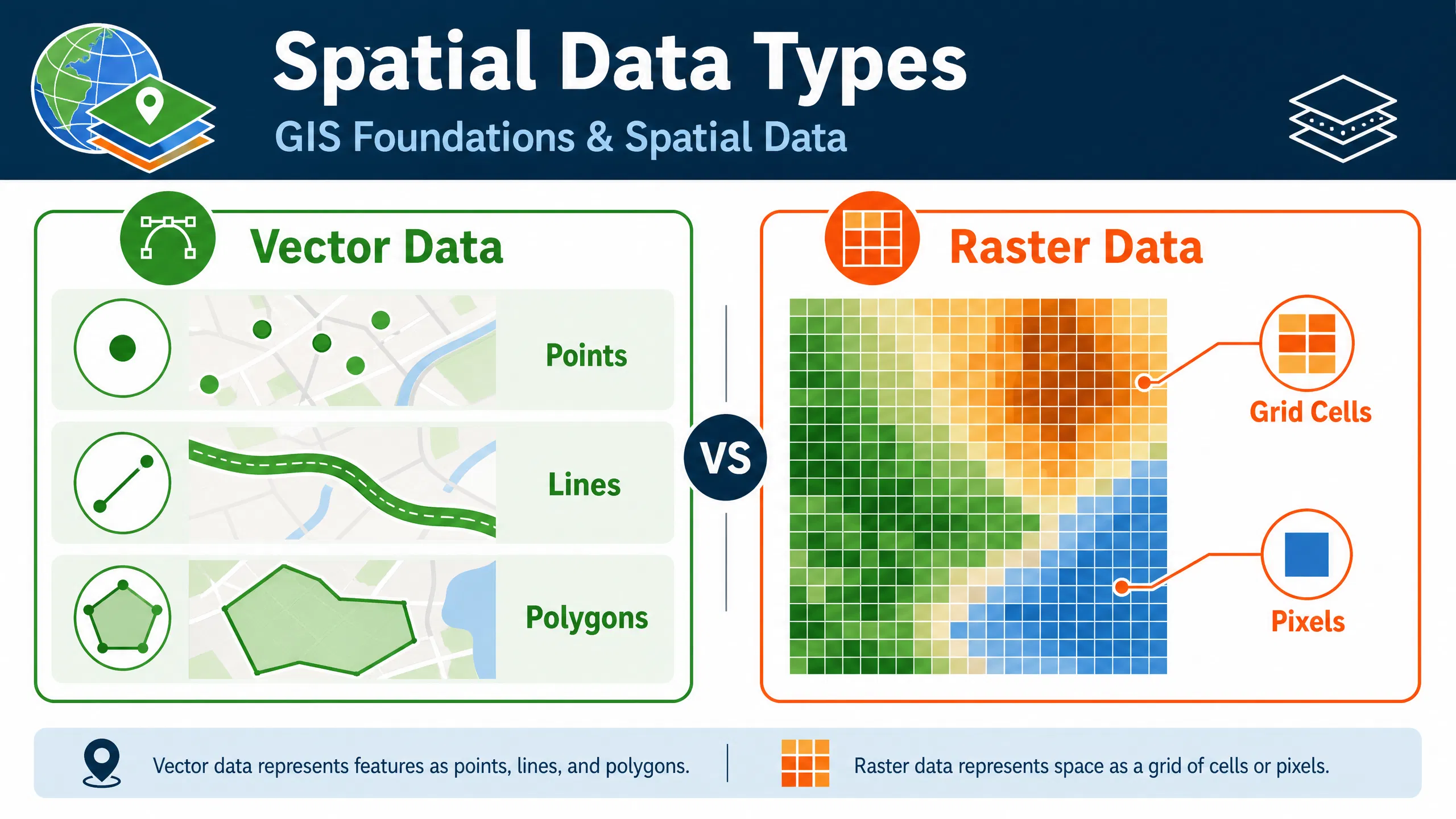
Spatial data represents the location and characteristics of real-world features. ArcGIS primarily works with two types of spatial data: vector and raster. Vector data includes points, lines, and polygons that represent discrete features such as roads, buildings, and boundaries. Raster data consists of grids of cells commonly used for satellite imagery, elevation models, and environmental analysis.
Understanding these data structures is essential because each serves different analytical purposes. A transportation planner may rely heavily on vector data, while a climate researcher might focus on raster datasets. ArcGIS allows users to combine both forms of data, creating powerful analytical models capable of answering complex geographic questions.
Learning Coordinate Systems and Projections
Coordinate systems often intimidate beginners, yet they form the backbone of GIS accuracy. Every map requires a framework for locating features on Earth’s curved surface. Different projections preserve different properties such as area, shape, distance, or direction. Learning how coordinate systems function prevents errors that can compromise entire projects.
A useful analogy is translating languages. Just as translation converts words between languages while preserving meaning, map projections convert Earth’s surface into flat maps while preserving selected geographic properties. GIS professionals who master projections gain a significant advantage when working with global datasets and multi-source spatial information.
Getting Started with ArcGIS Pro
ArcGIS Pro is now the flagship desktop GIS application from Esri. It offers a modern interface, advanced analytical tools, and seamless integration with cloud services. Learning the interface effectively accelerates every aspect of GIS development.
Installing and Configuring ArcGIS Pro
Successful learning begins with proper software configuration. New users should organize project folders, establish consistent naming conventions, and understand project structures. Creating a disciplined workspace from the start saves countless hours later. GIS projects often involve hundreds of datasets, making organization a critical professional skill.
Navigating the ArcGIS Interface
The ArcGIS Pro interface may appear overwhelming initially. However, once users understand the ribbon system, catalog pane, contents pane, and geoprocessing tools, navigation becomes intuitive. The key is repetition. Experienced GIS analysts often emphasize that proficiency comes from daily interaction with the software rather than passive learning. Community discussions surrounding ArcGIS certification consistently highlight hands-on experience as one of the most important success factors.
Mastering Data Management
Data management separates amateur GIS users from professionals. Even the most sophisticated analysis becomes unreliable when built on poorly managed data. Clean, organized, and validated datasets form the foundation of every successful GIS project.
Working with Geodatabases
Geodatabases provide structured storage environments for geographic information. They allow users to manage feature classes, relationships, domains, and topology rules within a centralized system. Learning geodatabases early dramatically improves workflow efficiency and data integrity.
| Data Storage Option | Best Use Case | Complexity |
|---|---|---|
| Shapefiles | Simple projects | Low |
| File Geodatabases | Professional GIS projects | Medium |
| Enterprise Geodatabases | Organizational GIS systems | High |
Professional organizations increasingly rely on enterprise geodatabases to support collaboration across departments and geographic regions.
Data Cleaning and Preparation
Data preparation often consumes more time than analysis itself. Missing values, duplicate records, inconsistent formats, and inaccurate coordinates can undermine project outcomes. ArcGIS provides extensive tools for cleaning and validating datasets. Experienced GIS professionals understand that high-quality analysis begins with high-quality data preparation.
Creating Professional Maps
Maps are the most visible output of GIS work. A well-designed map communicates insights instantly, while a poorly designed map creates confusion regardless of analytical quality.
Cartography Best Practices
Cartography is both science and art. Effective maps balance accuracy, clarity, and aesthetics. Color selection, symbol design, labeling, scale, and layout all influence interpretation. Professional cartographers focus on guiding the reader’s attention toward the most important information while minimizing distractions.
ArcGIS Pro includes extensive cartographic tools that support thematic mapping, custom symbology, and advanced layout design. These capabilities help users produce publication-quality maps suitable for decision-makers and stakeholders.
Designing Maps for Different Audiences
Not every audience requires the same level of detail. Engineers may need technical precision, while community members prefer simplified visualizations. Mastering audience-focused cartography enhances communication effectiveness and increases the practical impact of GIS work.
Developing Spatial Analysis Skills
Spatial analysis represents the heart of ArcGIS expertise. While map creation attracts many newcomers, analytical capabilities deliver the greatest professional value.
Overlay Analysis
Overlay analysis combines multiple layers to identify relationships and patterns. Urban planners might overlay population density, transportation networks, and land use data to identify ideal development locations. Environmental specialists can evaluate habitat suitability by integrating vegetation, elevation, and climate datasets.
Spatial analysis enables users to move beyond visualization and answer meaningful geographic questions. According to ArcGIS documentation, spatial analysis helps identify patterns, trends, relationships, and predictive insights that support decision-making.
Raster and Terrain Analysis
Raster analysis unlocks advanced capabilities involving elevation, imagery, hydrology, and environmental modeling. ArcGIS Spatial Analyst includes tools for terrain analysis, suitability modeling, solar radiation assessment, interpolation, density mapping, and image classification. These functions support applications ranging from renewable energy planning to disaster risk assessment.
Network Analysis
Network analysis focuses on movement through connected systems such as roads, pipelines, utilities, and transportation corridors. Organizations use network analysis to optimize routes, reduce costs, improve service delivery, and enhance operational efficiency. This skill remains highly valued across logistics, emergency response, and infrastructure sectors.
Automating GIS Workflows
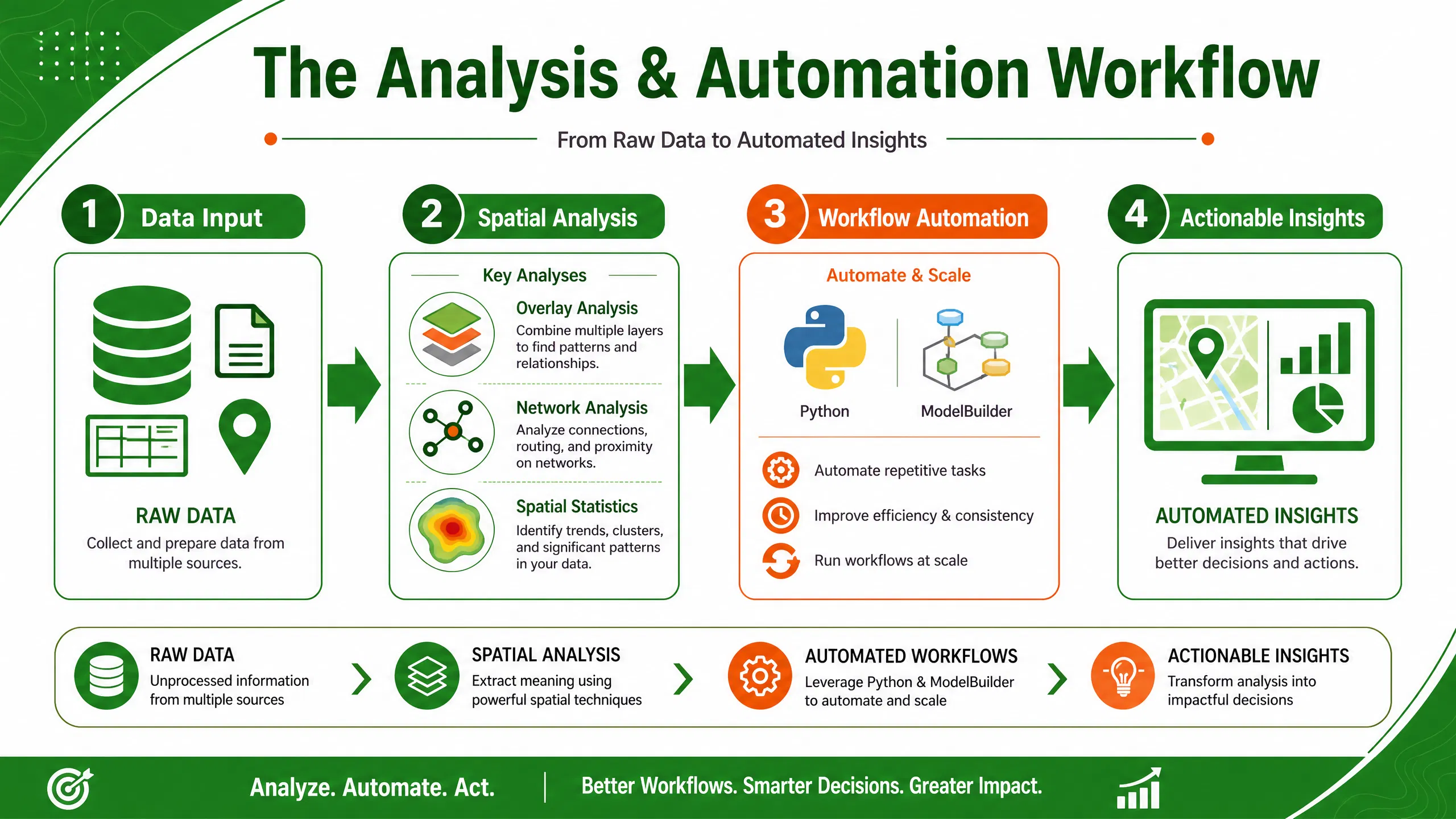
As projects grow larger, manual workflows become inefficient. Automation enables GIS professionals to process vast amounts of data consistently and accurately.
ModelBuilder Fundamentals
ModelBuilder provides a visual environment for automating geoprocessing workflows. Users can connect tools, datasets, and outputs into repeatable models that save time and reduce human error. Automation documentation from Esri highlights ModelBuilder as one of the most effective methods for streamlining complex GIS operations.
Python and ArcPy Automation
Python has become one of the most important complementary skills for GIS professionals. ArcPy, ArcGIS’s Python library, enables automation of mapping, data management, and analysis tasks. Industry discussions consistently identify Python automation as a high-demand capability in GIS careers.
A GIS analyst who can automate repetitive workflows often completes projects in hours rather than days. This efficiency translates directly into increased professional value and career advancement opportunities.
Advanced ArcGIS Capabilities
After mastering the fundamentals, users can explore specialized areas that distinguish advanced GIS professionals from intermediate practitioners.
3D GIS and Digital Twins
Three-dimensional GIS transforms how organizations visualize and analyze spatial information. ArcGIS Pro supports sophisticated 3D environments that model buildings, infrastructure, terrain, and urban systems. Digital twins combine real-world data with virtual representations, enabling planners and engineers to simulate scenarios before implementing costly changes.
Industries including urban planning, construction, utilities, and transportation increasingly rely on 3D GIS to improve decision-making and stakeholder engagement.
Machine Learning and AI in ArcGIS
Artificial intelligence is rapidly expanding GIS capabilities. ArcGIS Pro includes machine learning and deep learning tools for image classification, object detection, predictive modeling, and spatial pattern recognition. These technologies enable users to process large datasets more efficiently and uncover insights that traditional methods might overlook. ArcGIS documentation highlights growing integration between machine learning techniques and geographic analysis workflows.
Professional Training and Certification
Structured learning significantly accelerates ArcGIS mastery. While self-study remains valuable, professional training provides expert guidance, practical exercises, and industry-relevant applications.
Recommended Learning Resources
Professionals seeking structured GIS development can benefit from specialized training programs such as:
- ArcGIS Training Courses
- GIS and Remote Sensing Programs
- Spatial Data Analysis Training
- Geospatial Technology Courses
- Professional GIS Certification Preparation
Professionals interested in digital transformation and technology consulting can also explore Nexera Digital Solutions for broader digital innovation insights.
The most effective learning strategy combines formal training, practical projects, mentorship, and continuous experimentation. GIS professionals who consistently apply their knowledge to real-world challenges develop expertise much faster than those relying solely on theoretical study.
Building a GIS Career Portfolio
Employers increasingly evaluate portfolios alongside certifications and academic qualifications. A strong GIS portfolio demonstrates practical problem-solving abilities and technical competence. Include projects showcasing mapping, spatial analysis, automation, data visualization, and storytelling skills.
Portfolio projects might include environmental assessments, transportation studies, urban planning analyses, public health investigations, or disaster management applications. Quality matters more than quantity. A few well-documented projects often create a stronger impression than dozens of unfinished exercises.
Community discussions frequently emphasize that employers value demonstrated experience and project outcomes more than software familiarity alone. GIS professionals should focus on showcasing analytical thinking and measurable impact.
Conclusion
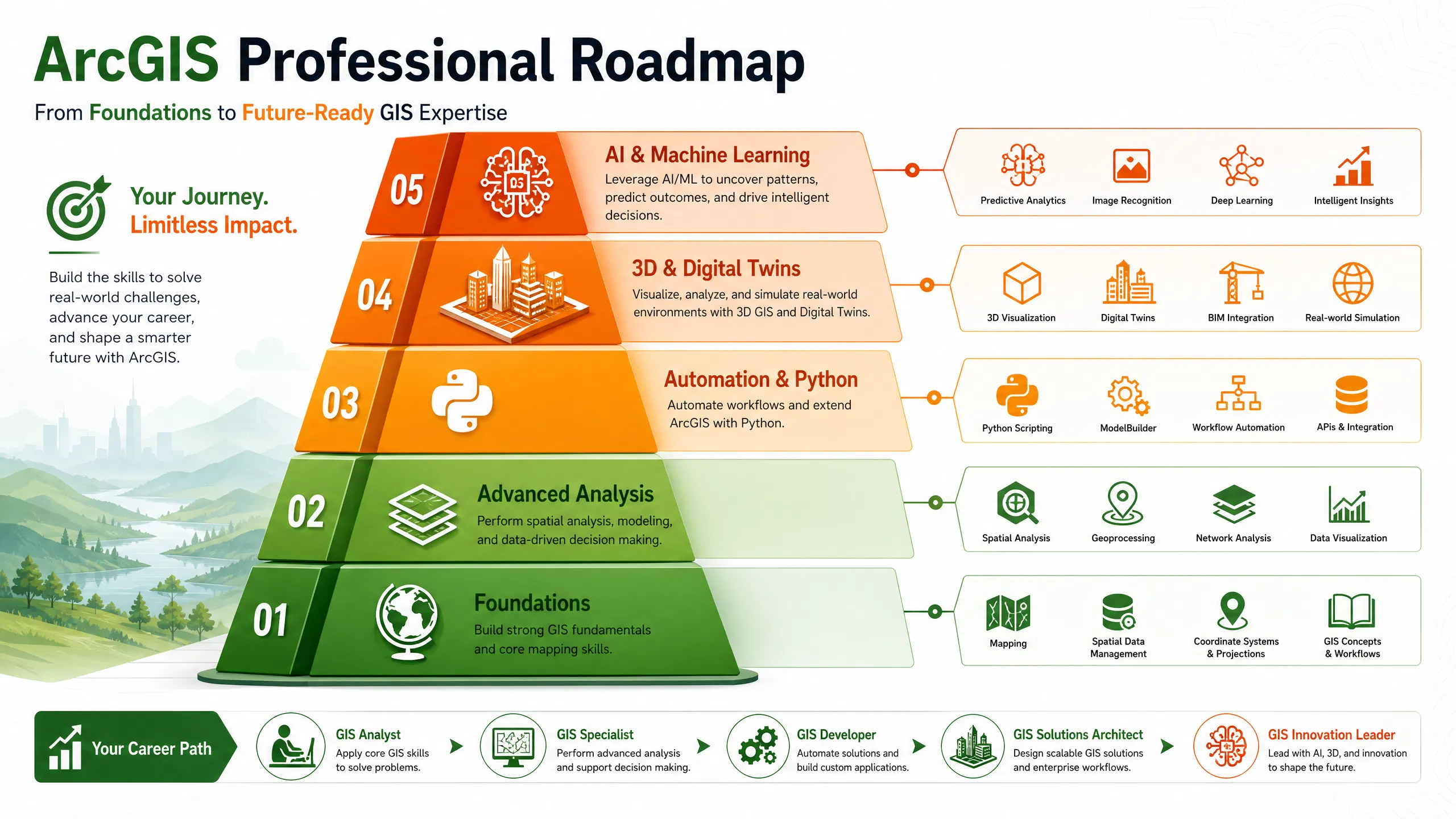
Mastering ArcGIS is a journey rather than a destination. The path begins with understanding spatial data, coordinate systems, and mapping fundamentals. From there, learners develop expertise in data management, cartography, spatial analysis, automation, and advanced technologies such as 3D GIS and machine learning. ArcGIS Pro continues to evolve, creating new opportunities for professionals who invest in continuous learning and practical application.
The most successful GIS professionals combine technical proficiency with problem-solving skills, communication abilities, and business understanding. Whether your goal is environmental management, urban planning, engineering, logistics, or data science, ArcGIS provides a powerful platform for transforming geographic information into meaningful decisions. By consistently practicing, pursuing professional training, and building a strong portfolio, you can confidently progress from beginner to GIS professional.
FAQs
1. How long does it take to learn ArcGIS?
Most beginners can learn fundamental ArcGIS skills within two to three months of consistent practice. Professional-level proficiency typically requires six months to two years depending on project complexity and learning intensity.
2. Is ArcGIS difficult for beginners?
ArcGIS has a learning curve, but beginners can quickly become productive by focusing on core concepts such as spatial data, mapping, and basic analysis before exploring advanced features.
3. Should I learn Python with ArcGIS?
Yes. Python significantly increases productivity by enabling workflow automation, data processing, and advanced analysis through ArcPy scripting.
4. What industries use ArcGIS the most?
ArcGIS is widely used in government, environmental management, urban planning, transportation, utilities, public health, defense, telecommunications, and engineering.
5. Is ArcGIS still in demand in 2026?
Yes. ArcGIS remains one of the most widely adopted GIS platforms globally, with growing demand for professionals skilled in spatial analysis, automation, cloud GIS, and AI-driven geospatial workflows.